Copy library / Guides / Grok Bot
Grok Bot drops connector calls after two minutes, so cap waits at 100 s
# Grok Bot 连接器调用两分钟超时:把等待上限压到 100 秒

Source: https://github.com/foxkill/steerlink/pull/16

Author: foxkill

作者在 Grok Bot 里测试发现它调用 get_session_updates 时带 wait_seconds: 120,而 Grok Bot 在没有进度通知时两分钟就会放弃连接器调用。于是 0.1.11 版对不请求进度的宿主把单次等待上限设为 100 秒,结果返回 status: running,下一次调用继续;带 progressToken 的宿主保持原等待并每 10 秒收到进度。
- What it does
- A test in Grok Bot showed it calls get_session_updates with wait_seconds: 120, while Grok Bot gives up on a connector call after two minutes without progress. Version 0.1.11 caps each wait at 100 s for hosts that do not ask for progress, returning status: running so the next call continues; hosts with a progressToken keep the full wait and get progress every 10 s.
- Scenarios
- Uncategorized
- What the source covers
- Author & original linkYes
- What it doesYes
- Verbatim source excerptYes
- Screenshots / mediaYes
- Steps / chaptersYes
- Verbatim prompt / configNot in source
- Results / numbersNot in source
- Risk notesYes
- Related entriesYes
— means the source doesn't say; we don't fill it in.
- Verbatim source excerpt
feat: cap waits at 100 s for hosts without progress (0.1.11)
## Why
A test run in Grok Bot showed it calls `get_session_updates` with `wait_seconds: 120`. Grok Bot gives up on a connector call after two minutes unless progress arrives. If Grok sends no `progressToken`, a long silent step (a build or test run without output) would hit that limit.
## What
- Hosts that do not ask for progress get at most 100 s per `send_prompt` (`timeout_seconds`) and `get_session_updates` (`wait_seconds`) call. The result then says `status: running`, and the next call continues.
- Hosts with a `progressToken` keep the requested wait; they get progress every 10 s (0.1.10).
- Tool descriptions and README updated; release 0.1.11.Show full post
## Tests
Unit tests for `effectiveWaitSeconds`. `npm run check` and `npm run test:package` pass locally.
🤖 Generated with [Claude Code](https://claude.com/claude-code)foxkill · · Open original ↗ From the project README, verbatim and untranslated.
- Screenshots
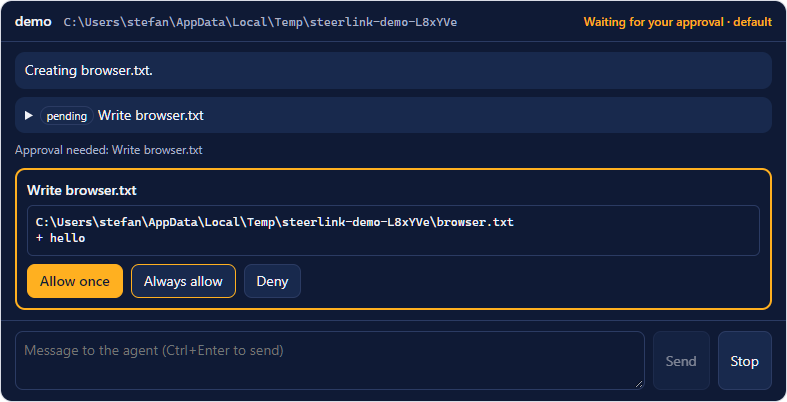
Image from the project README - Steps / points from the source
- start_session { cwd: "/path/to/project" }
- send_prompt { session_id, text: "…" } → status
- awaiting_permission: review pending_permissions (diff!), then respond_permission { permission_id, decision }
- running: repeat get_session_updates { session_id, wait_seconds: 30 }
- idle: the turn is done; read response_text and tool_calls
- Long tasks: send_prompt { …, wait: false } and poll.
- A click in the view is your own answer: the view's tools are hidden from the model, so it also counts in
- The view is one self-contained HTML document; it loads nothing from the internet, and everything from the agent is
Verbatim from the source, untranslated.
- Prompt
The source does not include a prompt you can copy verbatim.
- How to copy
- Open the repo: github.com/foxkill/steerlink/pull/16 ↗
- Read the README, send the repo link to your Bot and have it reproduce it
- Get it working small first, then add a routine
- Risks and limits
- The author's result may not reproduce for you; the original post is the reference
- Usage estimate
- Estimate with the metal calculator