Copy library / What got built / Grok Bot
GrokBot Switch: lend your PC to AI agents only when you're not using it
# GrokBot Switch:只在你不用电脑时才借给 AI 智能体

Source: https://github.com/oahuminister-collab/grokbot-switch

Author: oahuminister-collab

开源桌面小工具 GrokBot Switch 让 AI 智能体只在你不用电脑时借用它:绿色表示可用,红色表示勿扰,支持定时、空闲检测和先询问弹窗。基于 Python,面向 Windows。
- What it does
- The open-source desktop toggle GrokBot Switch lets AI agents borrow your PC only when you're not using it: green for Available, red for Do Not Disturb, with schedules, idle detection and an ask-first popup. Written in Python for Windows.
- Scenarios
- Calendar & meetings
- What the source covers
- Author & original linkYes
- What it doesYes
- Verbatim source excerptYes
- Screenshots / mediaYes
- Steps / chaptersYes
- Verbatim prompt / configNot in source
- Results / numbersNot in source
- Risk notesYes
- Related entriesYes
— means the source doesn't say; we don't fill it in.
- Verbatim source excerpt
oahuminister-collab/grokbot-switch
GrokBot Switch: a tiny desktop toggle that lets AI agents borrow your PC only when you're not using it. It's green for Available and red for Do Not Disturb, with schedules, idle detection and an ask-first popup.
ai-agents desktop-widget python windowsoahuminister-collab · · Open original ↗ From the project README, verbatim and untranslated.
- Screenshots
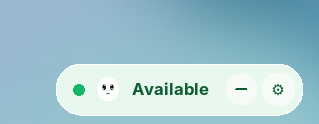
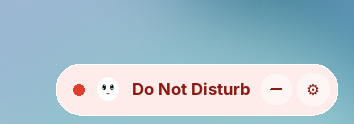
Image from the project README - Steps / points from the source
- An always-on-top pill shows the current state. Click the pill to flip it by hand. Click – to shrink it to a 28px status dot; click the dot to bring the pill ……
- A settings window lets you add or remove schedule rules (days, start, end, Available or Do Not Disturb), turn on auto Do Not Disturb while you are using the ……
- If a bot is using the PC and you start typing or moving the mouse, the switch turns red, the bot’s lease is revoked, and the bot should stop and move the job……
- Right-click the pill (or the minimized dot) and choose Exit to close the switch. There is no system tray icon in this version.
- Copy this folder to a place on the Windows PC you want to share, for example %USERPROFILE%\GrokBotSwitch\.
- Run the app with pythonw so no extra console window stays open:
- Leave Start with Windows off unless you turn it on in settings. That option only adds a small file in your Startup folder. It does not use Task Scheduler.
- Exit 0 means go ahead. The JSON line includes lease_id.
Verbatim from the source, untranslated.
- Prompt
The source does not include a prompt you can copy verbatim.
- How to copy
- Open the repo: github.com/oahuminister-collab/grokbot-switch ↗
- Read the README, send the repo link to your Bot and have it reproduce it
- Get it working small first, then add a routine
- Risks and limits
- Scheduled runs keep consuming usage: start at a low frequency and raise it once it is stable
- The author's result may not reproduce for you; the original post is the reference
- Usage estimate
- Estimate with the metal calculator