抄作业 / 做成了什么 / Meta Muse
Helicon:给 Muse Code CLI 做的开源桌面客户端
- 做了什么
- 作者每天用 Meta 的 Muse Code CLI,多项目多会话在终端里难管理,于是用 Tauri 2 + React 做了桌面应用和 VS Code 扩展:调用 muse serve、沿用现有 muse login 和订阅,可续接终端会话、内联审批 diff、直接看 5 小时和每周额度;MIT 开源,已到 v0.21.9,9 人贡献。
- 资料完整度
- 作者与原链接有
- 做了什么有
- 来源原文摘录有
- 截图 / 媒体有
- 步骤 / 章节有
- 提示词 / 配置原文来源未提供
- 结果 / 数字有
- 风险提示有
- 相关条目有
— 表示来源没有给出,本站不补写。
- 来源原文摘录
Show HN: Helicon – Desktop App for Meta's Muse Code CLI (Linux, Windows, macOS)
Hi Hacker News, I'm Harjot. I've been using Meta's Muse Code CLI daily for a few weeks now. One thing that I found difficult to handle was managing or controlling multiple sessions across multiple projects, while using the terminal for the muse CLI. Initially, I used cmux to create workspaces/groups for my different projects to group them, and then created 4 split terminals in each of those projects, that ran muse code sessions in each of them. It worked, but it was ugly. I didn't like展开全文
using that. It could be because I'm not really a terminal person and would much rather prefer a proper dedicated GUI or desktop/app interface, and I would prefer it any time over a terminal screen or CLI. So it might be personal preference but yeah.<p>So, I started building a desktop app around it, mainly to scratch my own itch.<p>Helicon is a desktop app for Windows, macOS and Linux, plus a VS Code extension that also works in Cursor and Devin. It doesn't replace the CLI. It runs `muse serve` and talks to it, and it reuses your existing `muse login`, so you don't have to get an API key and you don't pay an extra bill. You can use your existing Muse Code subscription plans.<p>Some things that I use the most:
1. Resuming sessions that I started in the terminal. I don't start many sessions in the terminal now that Helicon exists, but initially I wanted to access all the sessions that were running in a terminal to be accessible from Helicon, when it was created initially.
2. Inline diffs that I can approve, similar to how Cursor works.
3. I can clearly see my 5-hour and weekly plan limits directly from the app itself and don't have to manually keep going to Meta's Muse Code billing page and manually keep refreshing the page to see my current usage/limits.<p>I built it using Tauri 2 and React. It is MIT licensed. I built a lot of it with AIHarjot (harjjotsinghh) · · 打开原文 ↗ 作者原话,照录原文,未翻译。
- 效果截图

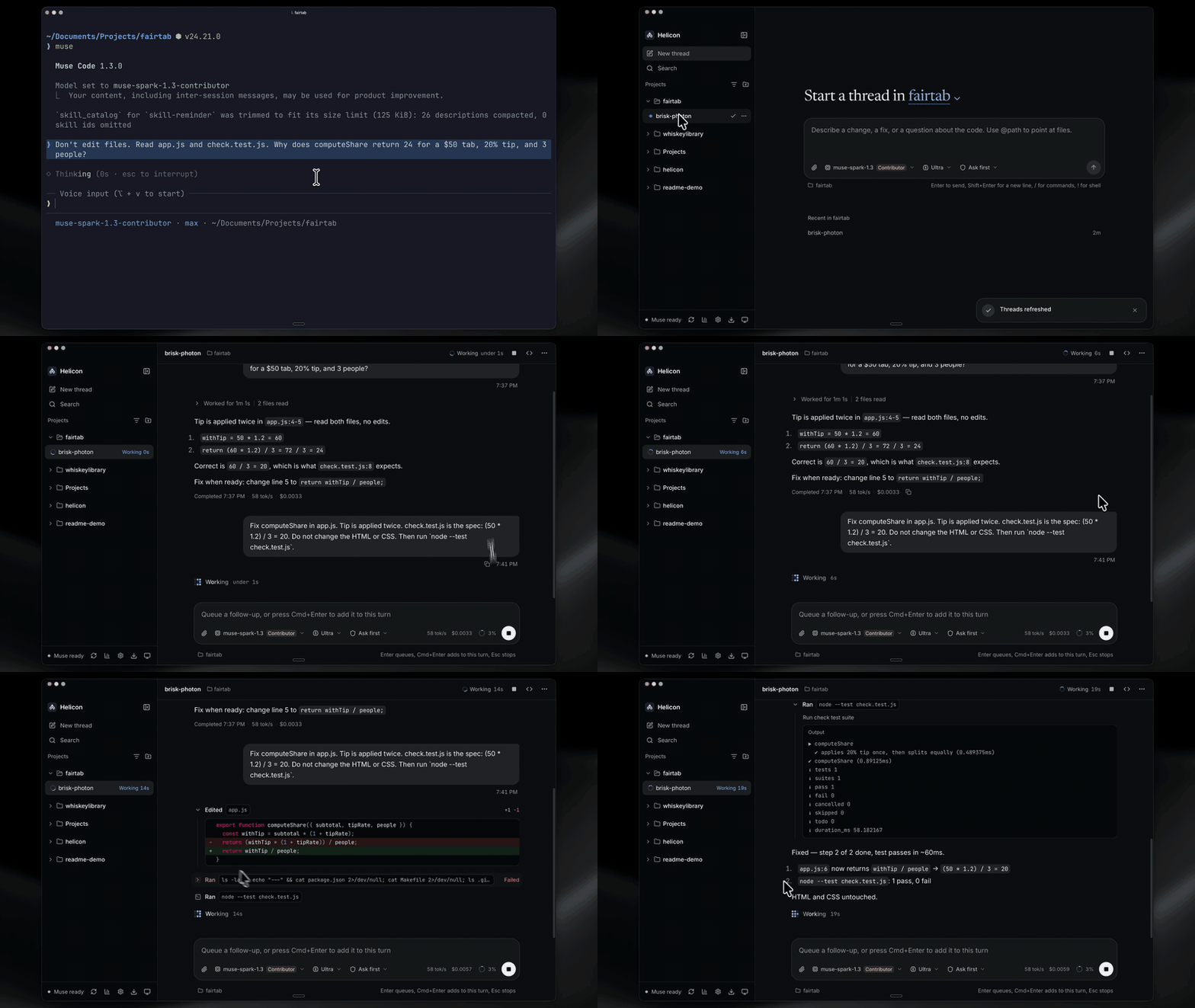
截图来自原帖 - 来源里的步骤 / 要点
- Projects grouped by directory the agent worked in (incl. isolated worktrees)
- Sessions/tasks per project with full history, resume, and diffs
- Approvals surfaced honestly (onRequest / promptUnmatched / denyUnmatched), never bypassed
- One codebase for desktop (Tauri) and web (same React UI against a remote daemon)
- Windows that actually works - runs Muse Code for Windows natively (no WSL), or Muse inside WSL2 with path translation if that is what you use
- A file viewer beside the thread - browse the project, read highlighted source, preview and edit Markdown, and view images, video and PDFs; paths Muse Code me……
- Your real plan meter - the 5-hour window and weekly cap as Muse Code reports them, in the sidebar and on the usage page
- Goals you can steer - set, pause, resume, change and clear a /goal from the goal panel or the composer
照录来源原文,未翻译。
- 提示词
来源没有给出可直接复制的提示词原文。
- 怎么复制
- 打开仓库:github.com/HarjjotSinghh/helicon ↗
- 读 README,把仓库链接发给你的 Bot,让它按 README 复现
- 先在小范围跑通,再加 routine
- 风险与限制
- 涉及付款、下单或预订:先让 Bot 只起草,确认后再执行
- 用到浏览器或网页登录:最耗额度,能用 connector 就别开浏览器
- 定时运行会持续消耗额度:频率从低开始,跑稳再加
- 作者的结果不保证能复现,以原帖为准
- 用量预估
- 用金属计算器估一下