Copy library / Guides / Grok Bot
Hooking Apple Messages to Grok Bot: four dinners become a 28-item list
# 把 Apple 信息接入 Grok Bot:四顿晚餐变成 28 项购物清单

Source: https://x.com/cdepino/status/2120270831938945517

Author: cdepino

作者早上把 Apple 信息接入 Grok Bot:先为 bot 打开 Messages,再在 Mac 的“系统设置 > 隐私与安全性 > 完全磁盘访问权限”里开启 Grok Bot,之后它就能读取已有短信,把四顿晚餐整理成 28 项购物清单。
- What it does
- The author turned on Messages for Grok Bot, then on the Mac enabled Grok Bot under System Settings, Privacy and Security, Full Disk Access. After that it could read existing texts, and four dinners turned into a 28-item shopping list.
- What the source covers
- Author & original linkYes
- What it doesYes
- Verbatim source excerptYes
- Screenshots / mediaYes
- Steps / chaptersNot in source
- Verbatim prompt / configNot in source
- Results / numbersNot in source
- Risk notesYes
- Related entriesYes
— means the source doesn't say; we don't fill it in.
- In the author's words
Four dinners, then 28 items on the list.
This morning I hooked Apple Messages to Grok Bot. I turned Messages on for it, then on the Mac I opened System Settings, Privacy and Security, Full Disk Access, and turned on Grok Bot. After that it could read the texts that had already https://t.co/A4Aj8OiPyx@cdepino · · Open on X ↗ The author's post, quoted verbatim and left untranslated.
- Screenshots
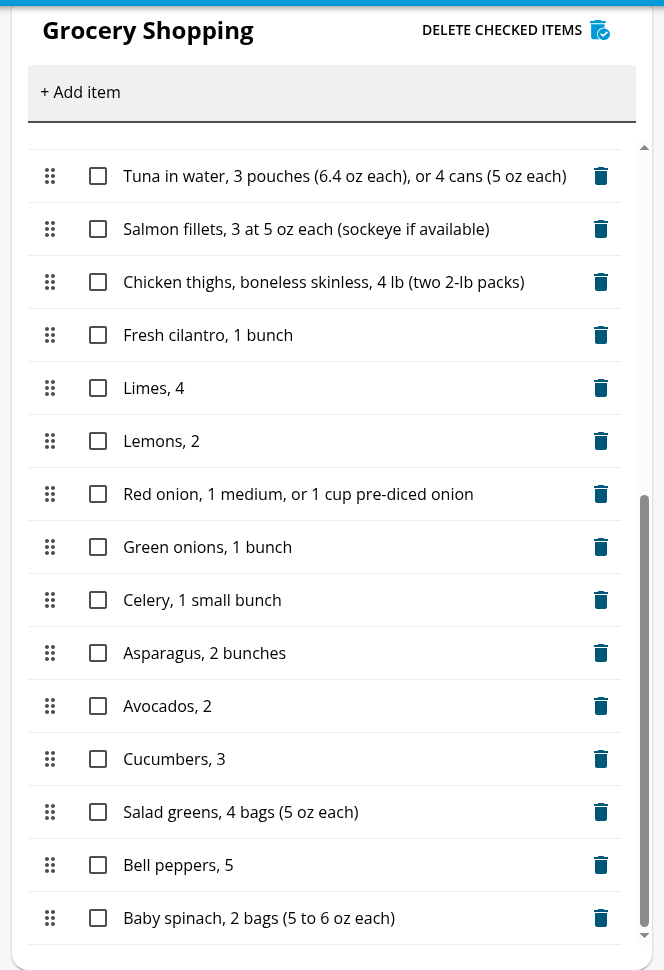
Screenshot from the original post - Prompt
The source does not include a prompt you can copy verbatim.
- How to copy
- Read the source: x.com ↗
- Turn the steps/prompts from the source into one message for your Bot
- Run it manually once, then decide the frequency
- Risks and limits
- The author's result may not reproduce for you; the original post is the reference
- Usage estimate
- Estimate with the metal calculator