Copy library / Guides / Grok Bot
Grok Bot tutorial: virtual try-on inside the app
# Grok Bot 新功能:在应用内虚拟试衣

Source: https://x.com/JennyMarquis/status/2124997079298871478

Author: JennyMarquis

作者介绍本周新增的购物功能:Bot 为喜欢的商品生成可点击的商品卡,打开后悬停在商品图上点「Try On」,Bot 会用你的自拍生成 1024×1024 的试穿预览,可在应用内编辑、保存或删除,也能更换自拍。
- What it does
- A walkthrough of this week's new shopping feature: your bot makes a clickable Product Card, you open it, hover over a product photo and click Try On. The bot uses your selfie to make a 1024 × 1024 preview of you in the outfit, which you can edit, save or delete in the app; the selfie can be changed.
- Scenarios
- Shopping & price checks Code & ship
- What the source covers
- Author & original linkYes
- What it doesYes
- Verbatim source excerptYes
- Screenshots / mediaYes
- Steps / chaptersNot in source
- Verbatim prompt / configNot in source
- Results / numbersNot in source
- Risk notesYes
- Related entriesYes
— means the source doesn't say; we don't fill it in.
- In the author's words
Grok Bot: Try on clothes inside the app👗
Here's a quick tutorial on how virtual try-on works in the Grok Bot app. It's a brand-new shopping feature that was added this week.
1. When you find an item you like, your bot can make a clickable Product Card for it. Click the Product Card to open a screen with the product's info and photos.
2. Hover over a product photo and you'll see a "Try On" button. Click it.
3. Your try-on preview will appear.Show full post
That's it! Your bot uses your selfie to make a quick preview of you wearing the outfit, so you can visualize the colors, textures, and fabrics.
The preview is 1024 × 1024 px. You can make edits right inside the app, and save, or delete it too.
How to change your selfie pic:
https://t.co/B0WgVEMejv
@bot@JennyMarquis · · Open on X ↗ The author's post, quoted verbatim and left untranslated.
- Screenshots
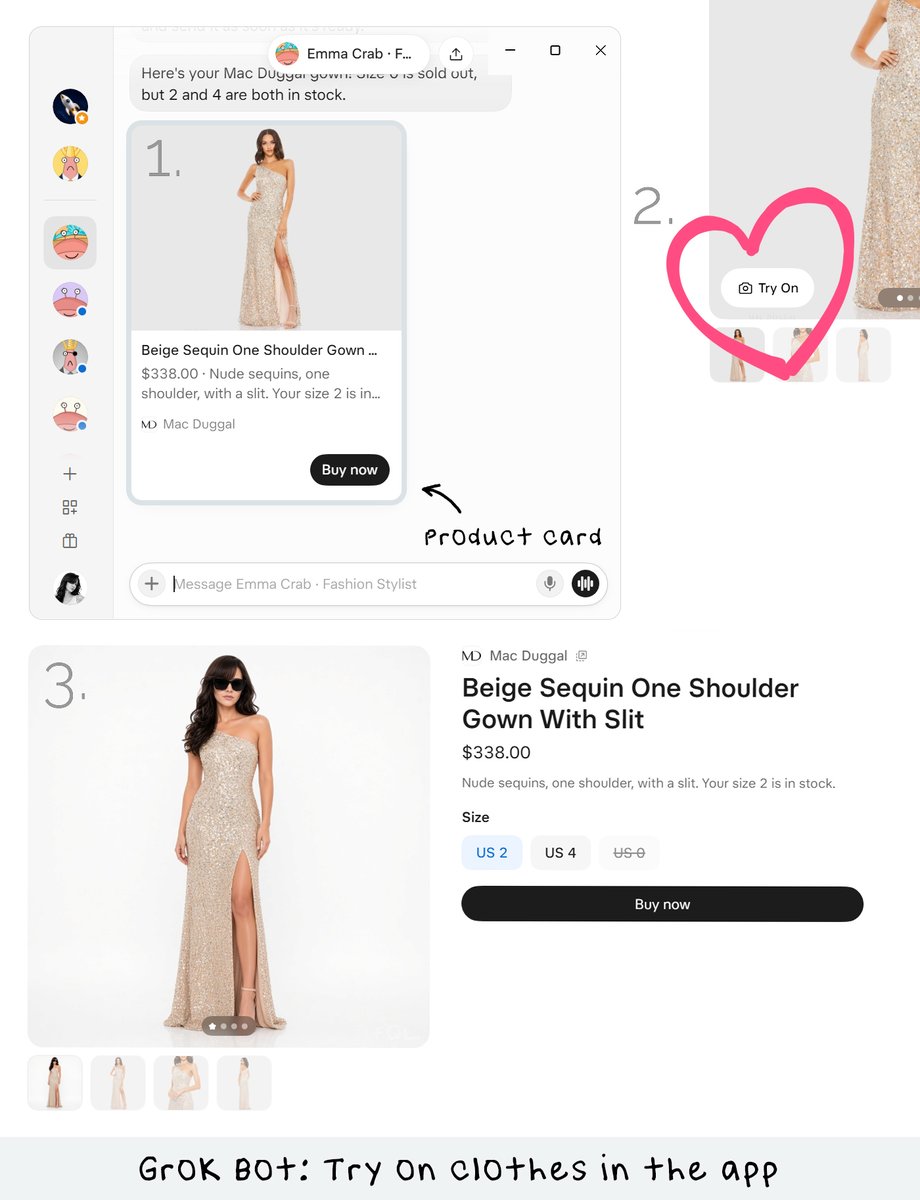
Screenshot from the original post - Prompt
The source does not include a prompt you can copy verbatim.
- How to copy
- Read the source: x.com ↗
- Turn the steps/prompts from the source into one message for your Bot
- Run it manually once, then decide the frequency
- Risks and limits
- Deletes, unsubscribes or cancels things: get a list first and confirm each item
- The author's result may not reproduce for you; the original post is the reference
- Usage estimate
- Estimate with the metal calculator