Copy library / Comparisons / Multiple
Wary of Dots, Grok Bot and Muse, he built a local email assistant
# 不放心 Dots/Grok Bot/Muse,自建本地邮件助理

Source: https://x.com/lesith/status/2122937013108375879

Author: lesith

作者因信任顾虑自建 Dragonfly:跑在 Mac mini 上,按计划盯 Gmail 和 Apple Mail 指定文件夹,用 Obsidian 记人和对话,有人等回复时起草,经 Telegram 提醒。只有对具体草稿回复“send”才会发送,发送是普通代码;邮件内容只当信息不当指令;每次工具调用都过闸门,改动可一键撤销。用 Claude Code、Python、Swift 构建。
- What it does
- Over trust concerns the author built Dragonfly on a Mac mini: it watches chosen Gmail and Apple Mail folders on a schedule, remembers people and conversations in an Obsidian vault, drafts replies when someone is waiting, and pings him on Telegram. It sends only when he replies "send" to that exact draft (sending is plain code, not AI); emails are treated as information, never instructions; a gate checks every tool call; every change can be undone with one click. Built with Claude Code, Python and Swift.
- What the source covers
- Author & original linkYes
- What it doesYes
- Verbatim source excerptYes
- Screenshots / mediaYes
- Steps / chaptersNot in source
- Verbatim prompt / configNot in source
- Results / numbersNot in source
- Risk notesYes
- Related entriesYes
— means the source doesn't say; we don't fill it in.
- In the author's words
How much can you trust OpenAI Dots, Grok Bots or Meta Muse? I did not want to wait for Claude Duet. So I am building my own.
Meet Dragonfly 🪽, a personal email assistant that lives on my Mac mini, not in someone else’s cloud.
What it does:
📬 Watches the Gmail and Apple Mail folders I point it at, on my schedule
🧠 Remembers people and conversations in an Obsidian vault I can read and edit
✍️ Drafts replies when someone is waiting on me
📱 Tells me on Telegram what needs meShow full post
What it can’t do is the part I care about most:
🔒 It can’t send anything unless I reply “send” to that exact draft. Sending is plain code, not AI.
🛡️ An email can’t give it orders. Everything it reads is treated as information, never as instructions.
🚧 A gate checks every single tool call. If it has read outside text, it can’t change its own rules, and those changes wait for my OK.
↩️ Every run is saved in its memory’s history, and I can undo any change with one click.
Built with Claude Code, Python, Swift and a lot of “what could go wrong here?”
Would you let an AI assistant into your inbox? What would it need to earn your trust? 👇
#AI #AIAgents #ClaudeCode #Anthropic #PersonalAI #Privacy #AISafety #BuildInPublic #IndieDev #Automation #Productivity #Obsidian #MacMini #SideProject@lesith · · Open on X ↗ The author's post, quoted verbatim and left untranslated.
- Screenshots
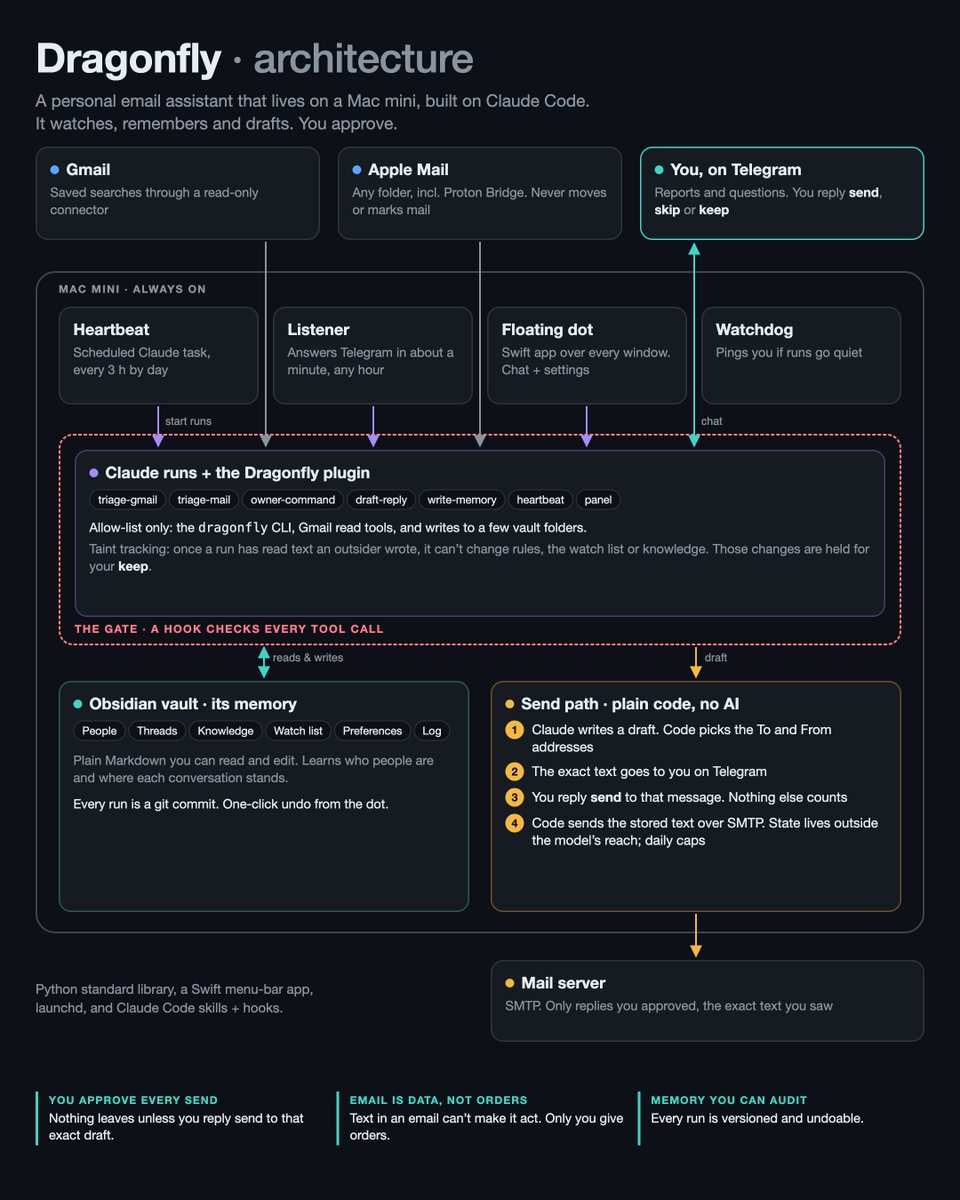
Screenshot from the original post - Prompt
The source does not include a prompt you can copy verbatim.
- How to copy
- Read the source: x.com ↗
- Turn the steps/prompts from the source into one message for your Bot
- Run it manually once, then decide the frequency
- Risks and limits
- Involves payments, orders or bookings: let the bot draft first and act only after you confirm
- Reads and writes your mailbox: grant read-only and draft access first, and approve before anything is sent
- Scheduled runs keep consuming usage: start at a low frequency and raise it once it is stable
- The author's result may not reproduce for you; the original post is the reference
- Usage estimate
- Estimate with the metal calculator