Copy library / Guides / Meta Muse
Meta Muse watching your inbox 24/7
# 用 Meta Muse 24 小时盯邮箱

Source: https://x.com/NiziUcci/status/2114836970795118609

Author: NiziUcci

作者介绍:用 Meta Muse 全天自动监控邮件,并提醒需要处理的邮件,减少漏掉重要联系的风险,也省下查邮件的时间。
- What it does
- The author explains using Meta Muse to monitor email around the clock and remind you of messages that need action, lowering the risk of missing something important and saving time spent checking mail.
- Scenarios
- Inbox triage Research & monitoring
- What the source covers
- Author & original linkYes
- What it doesYes
- Verbatim source excerptYes
- Screenshots / mediaYes
- Steps / chaptersNot in source
- Verbatim prompt / configNot in source
- Results / numbersNot in source
- Risk notesYes
- Related entriesYes
— means the source doesn't say; we don't fill it in.
- In the author's words
The original post is in Japanese and is shown on the Japanese page; open the source link to read it.
@NiziUcci · · Open on X ↗ The author's post, quoted verbatim and left untranslated.
- Screenshots
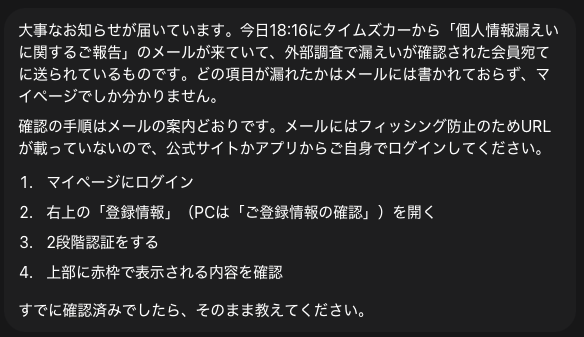

Screenshot from the original post - Prompt
The source does not include a prompt you can copy verbatim.
- How to copy
- Read the source: x.com ↗
- Turn the steps/prompts from the source into one message for your Bot
- Run it manually once, then decide the frequency
- Risks and limits
- Reads and writes your mailbox: grant read-only and draft access first, and approve before anything is sent
- The author's result may not reproduce for you; the original post is the reference
- Usage estimate
- Estimate with the metal calculator