抄作业 / 做成了什么 / OpenAI Dots
用 Dot 在 ChatGPT 里做了两个个人 App
- 做了什么
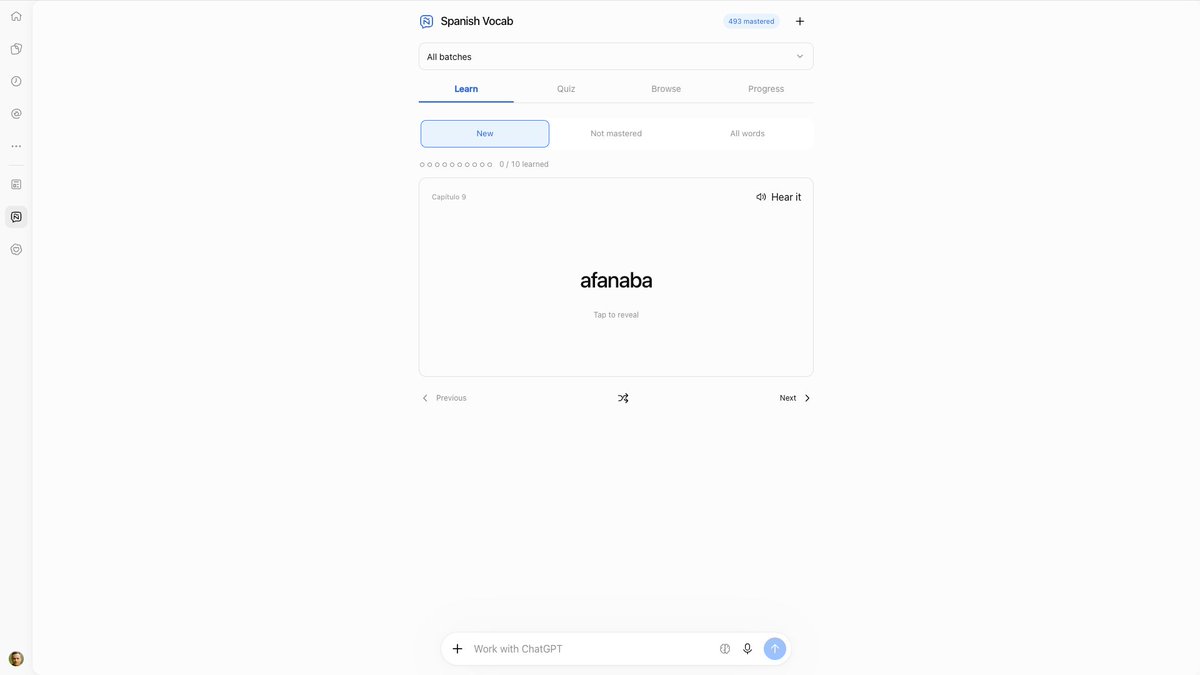
- Dot 用 ChatGPT Sites 做 MCP 后端、插件扩展做前端,做出个性化新闻 App 和西语词汇 App(Kindle 高亮导入、闪卡测验)。作者称 Dot 会盯着构建反复测试直到能用;不足是要提醒它换侧栏图标、插件测试不完整、看不到它在做什么。
- 资料完整度
- 作者与原链接有
- 做了什么有
- 来源原文摘录有
- 截图 / 媒体有
- 步骤 / 章节来源未提供
- 提示词 / 配置原文来源未提供
- 结果 / 数字来源未提供
- 风险提示有
- 相关条目有
— 表示来源没有给出,本站不补写。
- 作者原话
I've now created two personal apps in ChatGPT by using my Dot to create the backend in ChatGPT Sites as an MCP server and the frontend using a plugin with extensions. Overall, it's great, but there are some things that could be improved.
The two apps I've built are a personalized news app and a Spanish vocab app.
The news app was inspired by Muse's Feed and includes a feed of relevant news items that I can customize, with thumbs-up and thumbs-down feedback, and the ability to discuss an item with ChatGPT within the app.展开全文
The Spanish vocab app is a rebuild of something I built with Muse. I read Spanish books in my Kindle, highlight words I don't know, and then export them. They get imported into the app, where I learn them using flash cards, and quiz myself on what I've learned.
What works well:
- I love the integration into ChatGPT. Sidebar icons, full screen experience, integrated chat box, and that you can inherit the interface's style (or, at least, I asked my Dot to do that, and it looks like it's working). ChatGPT is becoming an OS. The sidebar is where you dock your apps. And you can build new ones with ChatGPT. Awesome.
- Dots make this pretty easy. They hide all the complexity and just get to work. No chain of thought, no tool calls, stuff just gets built and they share it with you when they're done. Just tell them to build it with a Sites-based MCP server and plugins with extensions. They'll figure it out.
- Dots are good build babysitters. I tried the same Spanish vocab app yesterday in a Work thread directly, and the app ended up not working. There was some kind of connection issue between the plugin and the MCP server. My Dot just babysits and tests stuff until it's working and polished.
However, there's room for improvement, and I hope OpenAI can act on this feedback:
- When building these, my Dot needs reminding to add proper sidebar icons rather than the default "@" and also to ensure the plugin icon matches those sidebar icons. It also can't figure out how to change the version in the plugin from v1.0.0, because it says v1.0.0 even when it makes the version different in the code, like v0.14.1 or whatever. Both of these suggest that Dots or the threads they oversee need updated skills for building custom apps in ChatGPT, and possibly that the version indicator in plugins isn't working properly.
- My Dot has struggled to fully test the plugins it builds. One time this was because of Sites authentication issues, though this may have been resolved because for my Spanish vocab app it didn't come up.
- For design cohesiveness, Dots or the threads they oversee should default to building plugins with ChatGPT styles rather than coming up with their own designs, unless the user requests it. This will make apps feel more native and could also alleviate some design decisions from the models and ensure apps are more elegant and usable.
- It's often unclear my Dot is doing anything, and there's no way to see what it's doing. It just goes into a black hole. I've complained about this before but it's a big issue when you're working on something and trying to understand where it's at. I would like: (1) an emoji reaction to indicate my Dot got my request, (2) some short text below my Dot to say what it's up to currently, (3) the ability to see with a click the threads my Dot is overseeing or that have completed (progressive disclosure).
I should also mention that I built the Spanish vocab app in Muse as well (originally), and then in Claude as an artifact. Muse is faster and seemed to get my intent better than my Dot. Claude did about as good of a job as my Dot on first request, but the Claude app doesn't have the same ability to integrate apps in the more native way that Muse and ChatGPT do.@_simonsmith · · 在 X 打开 ↗ 作者原话,照录原文,未翻译。
- 效果截图

截图来自原帖 - 提示词
来源没有给出可直接复制的提示词原文。
- 怎么复制
- 读原文:x.com ↗
- 把原文里的步骤/提示词整理成一条消息交给 Bot
- 先手动跑一次,再决定频率
- 风险与限制
- 作者的结果不保证能复现,以原帖为准
- 用量预估
- 用金属计算器估一下