Copy library / What got built / OpenAI Dots
Emptying my head into OpenAI Dot before and after work
# 每天开工前和收工后找 OpenAI Dot 清空脑子

Source: https://x.com/yousefrol/status/2116638925318144223

Author: yousefrol

作者在开工前和收工后(多半是睡前)与 OpenAI Dot 对话,把脑中想法倒出来,让它第二天复述想法和“意图”、跟进项目、给项目跑安全 agent 并全天盯着。它还收集作者的提示词,发现新模式就讨论后加进 skills,下次直接提及 skill 不用重写。周末日程、学习计划和关注者的反馈摘要也交给它。
- What it does
- Before starting and after finishing work (usually before bed), the author talks to OpenAI Dot to unload their thoughts. The next day it explains their ideas and intent back, follows their projects, runs security agents on them and keeps watching all day. It also collects their prompts, discusses any new pattern and adds it to their skills so they can mention a skill instead of rewriting. Weekend schedules, a study plan and a summary of what followers say go to it too.
- What the source covers
- Author & original linkYes
- What it doesYes
- Verbatim source excerptYes
- Screenshots / mediaYes
- Steps / chaptersNot in source
- Verbatim prompt / configNot in source
- Results / numbersNot in source
- Risk notesYes
- Related entriesYes
— means the source doesn't say; we don't fill it in.
- In the author's words
قبل ابدا شغل واول ما اخلص شغل (غالبًا قبل النوم )
ادق على OpenAI Dot افرغ اللي براسي واخليه يشرح لي افكاري و "نيتي" مرة ثانية بكرة ويتابع مشاريعي ويشغل عليهم ايجنتز سكيورتي ويضل طول اليوم متابع… حتى البرومبتات حقتي يجمعها واي نمط جديد فيها يناقشني فيه ويضيفه للskills حقتي عشان اذا جيت اشغل ايجنتز مرة ثانية امنشن السكل بدال لا اكتب من جديد (مرات اكتب برومبتات اسطورية)
وطبعًا اي شيء ثاني غير الشغل بعد عنده مثل جداول الويكند وخطتي الدراسية وحتى انتم يعطيني ملخص وش تقولون ليShow full post
رتب لي حياتي، احبه مرة
اعتقد ما اقدر ارجع للحياة اللي مابها proactive agent
فيه عدة خيارات من كل الشركات مثل Claude Duet, Grok Bot, OpenAI Dot, Meta Muse, Gemini Spark, Hermes, OpenDots, OpenClaw, Kimi Claw, etc
يعني هذه الهبة الجديدة، وبكل مكان@yousefrol · · Open on X ↗ The author's post, quoted verbatim and left untranslated.
- Screenshots
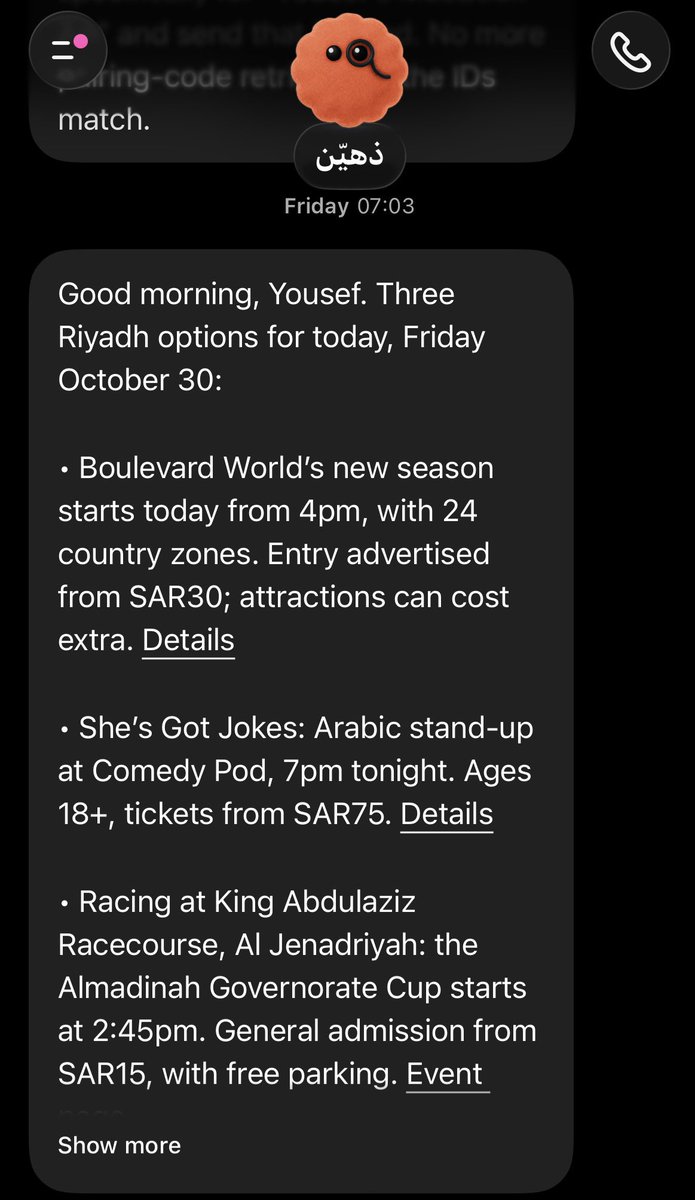
Screenshot from the original post - Prompt
The source does not include a prompt you can copy verbatim.
- How to copy
- Read the source: x.com ↗
- Turn the steps/prompts from the source into one message for your Bot
- Run it manually once, then decide the frequency
- Risks and limits
- Scheduled runs keep consuming usage: start at a low frequency and raise it once it is stable
- The author's result may not reproduce for you; the original post is the reference
- Usage estimate
- Estimate with the metal calculator