Copy library / What got built / OpenAI Dots
Working with OpenAI Dots over iMessage
# 通过 iMessage 和 OpenAI Dots 协作

Source: https://x.com/KyleBlanchard_/status/2115541017202204686

Author: KyleBlanchard_

作者说没想到 iMessage 和 OpenAI Dots 这么搭:开完会收到 Dot 发来的短信去完成一项调研任务,还能用表情回应等,感觉很自然,称这是一次大升级。
- What it does
- The author says iMessage and OpenAI Dots pair better than expected: after a meeting they got a text from their Dot to complete a research task, plus reactions and more, which felt natural. They call it a major level up.
- Scenarios
- Calendar & meetings Research & monitoring
- What the source covers
- Author & original linkYes
- What it doesYes
- Verbatim source excerptYes
- Screenshots / mediaYes
- Steps / chaptersNot in source
- Verbatim prompt / configNot in source
- Results / numbersNot in source
- Risk notesYes
- Related entriesYes
— means the source doesn't say; we don't fill it in.
- In the author's words
I wasn’t expecting iMessage & @OpenAI Dots to be such a good pairing.
Getting a text from my Dot after a meeting to complete a research task, and getting reactions, etc. just feels so natural.
This is a major level up. https://t.co/QOC69ppKrl@KyleBlanchard_ · · Open on X ↗ The author's post, quoted verbatim and left untranslated.
- Screenshots
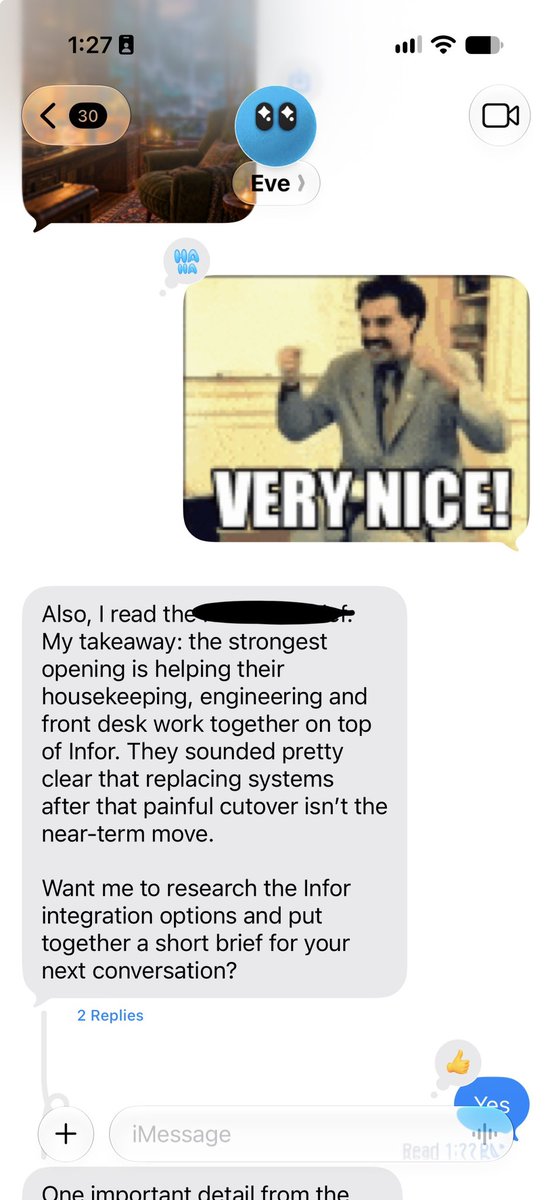
Screenshot from the original post - Prompt
The source does not include a prompt you can copy verbatim.
- How to copy
- Read the source: x.com ↗
- Turn the steps/prompts from the source into one message for your Bot
- Run it manually once, then decide the frequency
- Risks and limits
- The author's result may not reproduce for you; the original post is the reference
- Usage estimate
- Estimate with the metal calculator